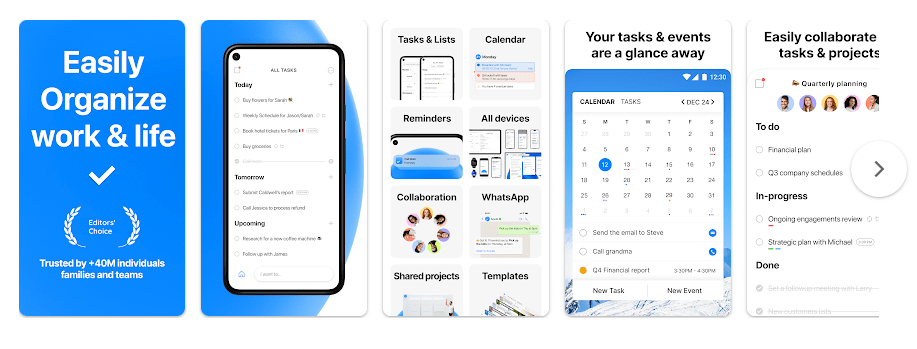
Any.do is a task and planning app for Android. It helps you write down things you need to do, set reminders, plan your day, and keep tasks with your calendar. You can use it for simple jobs like shopping, paying bills, school work, or office tasks.
The main idea is simple. Instead of trying to remember everything, you put each task in the app. Any.do also lets you add subtasks, notes, files, and reminders. Its My Day view helps you pick the tasks you want to finish today.
How It Compares to Other Apps
Any.do is a good middle choice between a simple task list and a full planning app. Compared with Todoist, it puts tasks and calendar planning together and also offers shared spaces for families, while Todoist is more focused on task management. TickTick has extra tools such as a Pomodoro timer and habit tracker, while Any.do puts more focus on tasks, calendar use, shared lists, and daily planning.
Key Tools Explained
- My Day: This view shows the tasks you want to work on today. It helps keep a long task list from feeling too large.
- Tasks and Subtasks: You can create a main task and break it into smaller steps. Personal tasks and subtasks are available on the free plan.
- Calendar: Any.do can show your tasks with calendar events in one place. This makes it easier to see what needs to be done around your daily schedule.
- Reminders: You can set reminders for tasks so the app can alert you at the right time. Location reminders are also available on mobile for Premium, Family, and Workspace users.
- Shared Lists: You can share tasks and lists with other people. Family and Workspace plans also support shared boards for group work.
Two Days of Testing
I tested Any.do on an Android phone similar to a Redmi device for two days. The main task screen was easy to understand, and adding a new task did not take many taps.
Moving between the task list, daily planning area, and other sections felt quick during normal use. I did not notice major lag, crashes, or serious heating during regular task use. Battery use also stayed reasonable during basic testing, although reminders and background syncing can use some battery because the app needs to keep information updated.
The app is not just a simple offline list. It relies on account syncing, so users should give it time to sync after making changes. Any.do says offline use is possible in limited cases, but changes may not fully save until the phone reconnects to the internet.
Memory, Storage, and Safety
The current Android version 5.19.0.2 has a listed APK size of 64.07 MB. The installed size can be different because Android may add app data and other files after installation.
Any.do supports Android 7.0 and newer according to current version information.
The app may ask for notifications, contacts, location, camera, microphone, photos or files, calendar access, phone access, account access, and internet-related permissions. Not every feature needs every permission, and Any.do says many requests appear only when you use the related feature.
Upsides and Downsides
Pros
- Easy way to make and manage tasks.
- My Day helps with daily planning.
- Calendar and tasks can work together.
- Subtasks are available on the free plan.
- Works across Android, iPhone, web, and desktop.
Cons
- Offline use is limited.
- Some useful reminders need a paid plan.
- Many device permissions can be requested for different tools.
- The app needs an account for full syncing between devices.
Who Should Get It?
Recommended For
- People who want tasks and calendar planning in one app.
- Families or small groups that need shared lists and tasks.
Not Recommended For
- People who want a very small offline-only to-do app.
- Users who do not want cloud syncing or several device permissions.
3 Quick FAQs
Is Any.do free to use?
Yes, Any.do has a free plan with personal tasks and subtasks. Paid plans add features such as advanced reminders and other planning tools.
Can I use Any.do without internet?
Yes, but only in a limited way. You can usually view and add items offline, but Any.do recommends reconnecting and syncing because changes may not fully save while offline.
Does Any.do have location reminders?
Yes, but location reminders are not part of the Free plan. They are available on mobile for Premium, Family, and Workspace users.
Offzack Verdict
Any.do is a useful choice for people who want more than a basic to-do list. Its mix of tasks, daily planning, calendar tools, reminders, and shared lists makes it useful for home and work. The 64.07 MB app is not tiny, and users should check the permissions before using features such as location reminders, voice notes, files, or calendar syncing.
Download Any.do App from Google Playstore
Final Scorecard
- Ease of Use: ★★★★☆ — The task list and My Day screen are simple to understand.
- Performance: ★★★★☆ — Normal task use feels quick without major problems.
- Features: ★★★★★ — Tasks, subtasks, calendar, reminders, search, and sharing cover many daily needs.
- Privacy & Safety: ★★★☆☆ — Several permissions may be needed, depending on which features you use.
- Value for Money: ★★★★☆ — The free plan covers basic task management, while paid plans add more tools.
- Overall Rating: ★★★★☆ — Any.do is a solid choice for users who want tasks and daily planning together.