I tested NoteCalc on a budget Redmi Android phone for two days. The app ran smoothly during my test, and I did not face any major problems while using it.
The main test was note-based calculations. I entered calculations as part of my notes and checked the answers shown by the app. The results were correct every time during my testing.
I did not notice major lag while using the calculator. The app also did not show any visual problem that affected my test. My phone did not become unusually hot while I was using NoteCalc for these calculations.
The test was simple, but it covered the main reason I would use a note calculator. I wanted to see if I could keep the calculation and the answer together instead of using a normal calculator and then writing the result somewhere else.
What This App Actually Does
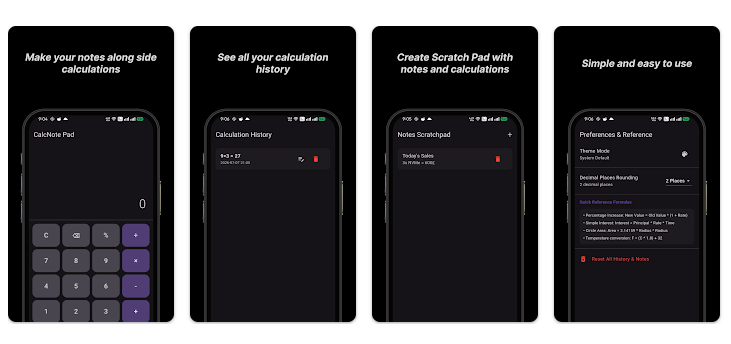
NoteCalc is made for people who want to do calculations while keeping them in a note. Instead of treating every calculation as a separate task, the app lets you work with numbers in a note-style space.
This can be useful when you need to check several numbers in one place. For example, you can use a note to keep track of small calculations instead of opening a calculator again and again.
Top 5 Features That Matter
- Note-based calculations: You can keep calculations inside a note-style workspace. This makes it easier to see the work and its result together.
- Instant calculation results: The app gives calculation results while you work with your numbers. In my test, the results were always correct.
- Calculation with notes: Numbers can be kept with the information around them. This can make a calculation easier to understand later.
- Simple calculation workflow: The main test did not require a complicated setup. I could use the calculation feature directly on my Redmi phone.
- Useful for daily math: The note-based approach can be used when you need to keep several calculations together. It is more useful for written calculation work than simply checking one number.
Storage Space and Data Use
I did not record the exact download package size, installed size, or cache size during my two-day Redmi test. Because of that, I would not give a made-up MB figure.
I also did not run a separate mobile-data measurement. My hands-on test focused on note-based calculations and accuracy, so this review does not claim a specific MB amount for internet use.
For readers who need exact storage or data figures, the current Google Play listing is the best place to check before installation.
Permissions and App Safety
I did not perform a separate permission audit on the Redmi phone during this test. So I am not listing permissions that I did not personally verify.
The same rule applies to data safety details. Google Play provides a Data Safety section for apps, but those details can change when developers update their apps. Check the current Play Store listing before installing if privacy is an important part of your choice.
How It Compares to 2 Alternatives
NoteCalc sits in the same general area as notepad calculator apps such as Soulver and Numi, which also focus on keeping calculations with written information. Notes Calculator offers a free plan with one tab and a paid lifetime option for extra features, while Numi has a free single-note option and a paid license. NoteCalc is worth considering if your main need is keeping calculations inside notes and you prefer a simple Android experience.
Good Things & Bad Things
Pros
- Ran smoothly during my two-day Redmi test.
- Note-based calculations were easy to test.
- Calculations were correct every time during testing.
- No major lag was noticed.
- No major visual bugs affected my test.
Cons
- I did not test advanced calculation tools.
- Exact storage use was not measured.
- Exact mobile-data use was not measured.
- A full permission audit was outside my test.
Who Is It For?
Best For
- People who want calculations and notes together.
- Users who need to check several calculations in one place.
Not For
- People looking for a full scientific calculator review.
- Users who need exact storage and data-use figures before installing.
Common Questions
Is NoteCalc accurate?
During my test, NoteCalc always gave the correct results. I tested its note-based calculation feature on a Redmi phone.
Did NoteCalc run smoothly?
Yes. It ran smoothly during my two-day test, with no major issues noticed.
Is NoteCalc easy to test?
Yes. The main calculation feature could be tested directly without a complicated setup. The note-based format was the main part of my hands-on test.
Offzack Verdict & Link
NoteCalc gave me a good result in the area I tested most. It ran smoothly on my Redmi phone, and its note-based calculations produced correct answers every time during my test.
Download CalcNote: App on Google Playstore
Final Scorecard
- Ease of Use: ★★★★☆ — The main note-based calculation feature was simple to test.
- Performance: ★★★★☆ — It ran smoothly on my budget Redmi phone.
- Features: ★★★★☆ — The note-based calculation idea is useful for keeping math together.
- Privacy & Safety: ★★★☆☆ — I did not perform a full permission or privacy audit.
- Value for Money: ★★★★☆ — The tested calculation feature worked well for basic daily use.
- Overall Rating: ★★★★☆ — NoteCalc worked smoothly and gave correct results in my hands-on test.
SEO Friendly Title:
NoteCalc Review: Accurate Note-Based Calculator Tested on Redmi