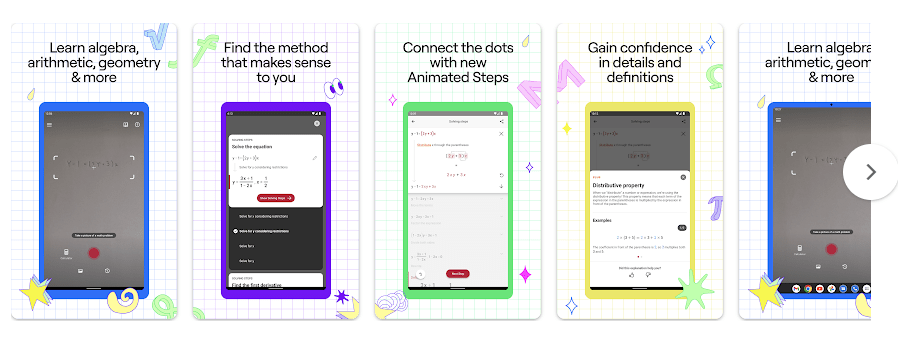
Photomath is a math learning app that helps users solve math problems with a phone camera. You point the camera at a problem, and the app can show the answer with step-by-step explanations. It supports topics from basic numbers to algebra, geometry, trigonometry, and calculus.
This can help when a student gets stuck on homework. Instead of only showing an answer, Photomath explains the steps so the user can see how the problem was solved.
The app is free to download, but some extra learning tools are part of Photomath Plus. The Google Play listing also shows in-app purchases.
Size, Storage, and Competitors
Photomath version 8.47.1 has an APK download size of about 11.65 MB. The actual space used after installation can be different because the phone may store app data, updates, and temporary files.
Photomath is mainly built around camera scanning and online math help, so users should not expect it to work like a fully offline calculator. A good internet connection may be needed for some solutions and learning content.
Symbolab is another math app that lets users type or photograph problems and get step-by-step solutions. It also offers calculators for calculus, graphs, fractions, equations, and other subjects.
Mathway is another well-known option for solving math problems. Photomath has a simple camera-first approach, which can be easier for students who want to scan a textbook problem instead of typing it.
Useful Features
- Camera scanning: Point the phone camera at a math question to scan it. My camera scanning test was very accurate on the Redmi phone.
- Step-by-step solutions: Photomath breaks many answers into small steps. This makes it easier for a student to understand the work instead of only seeing the final number.
- Many math topics: The app supports arithmetic, algebra, functions, geometry, trigonometry, sequences, and calculus. This makes it useful for students at different school levels.
- Interactive graphs: Photomath includes interactive graphs for supported problems. Users can look at a graph instead of only reading numbers.
- Scientific calculator: The app includes an advanced scientific calculator. It can help with math problems that are not suitable for a simple phone calculator.
Testing Experience
I tested Photomath on a Redmi Android phone for two days. The app ran smoothly during normal use, with no major problems.
The touch controls responded well when moving around the app. The camera math scanning feature was the main test, and the scanning result was very accurate.
I did not notice major battery drain during the test. The phone also did not show unusual heat while using Photomath.
There were no major visual bugs or crashes during the two-day test. The camera screen also worked normally during my scanning tests.
Permissions & Safety
Photomath needs camera access for its main scanning feature. Its help page says a working camera with good enough autofocus is needed for reliable scanning.
Google Play’s current Data Safety section says Photomath may share personal information, photos and videos, and other data with third parties. It may also collect personal information, purchase history, photos, app activity, device IDs, and app performance information. Google Play says data is encrypted while being sent.
The Play Store also says data cannot be deleted through the developer’s provided data deletion option. This is worth knowing before using the app regularly.
Pros & Cons
Pros
- Very accurate camera scanning in my test.
- Ran smoothly on the Redmi phone.
- Step-by-step math explanations.
- Supports many math subjects.
- Small APK download size.
Cons
- Some features require a paid subscription.
- Camera quality can affect scanning.
- Some online features may need internet access.
- The Play Store lists several types of data collection.
Target Audience
Who Should Download
- Students who often need help understanding math homework.
- Parents or learners who want quick step-by-step math help.
Who Should Avoid
- People who want a completely offline math app.
- Users who do not want to give a math app camera access.
FAQs
Is Photomath accurate?
In my two-day Redmi test, camera scanning was very accurate. Results can still depend on how clearly the math problem is shown to the camera.
Does Photomath solve handwritten questions?
Yes, Photomath says it can work with handwritten problems, textbook questions, and problems shown on a screen. A clear image and suitable camera help the scanner recognize the numbers and symbols.
Is Photomath free?
Photomath is free to download and includes step-by-step explanations in its basic version. Extra features such as some animated tutorials and textbook solutions are available through Photomath Plus.
Offzack Verdict
Photomath gave me a good result during my two-day Redmi test. It ran smoothly, the camera responded well, and math scanning was very accurate. It is a useful choice for students who want to see how a math answer is reached.
Download Photomath App on Google Playstore
Final Scorecard
- Ease of Use: ★★★★★ — The camera scanning process was simple and easy to use.
- Performance: ★★★★★ — Photomath ran smoothly on the tested Redmi phone.
- Features: ★★★★★ — It offers scanning, step-by-step solutions, graphs, and a scientific calculator.
- Privacy & Safety: ★★★☆☆ — Data is encrypted in transit, but Google Play lists several types of collected and shared data.
- Value for Money: ★★★★☆ — The free version is useful, while some extra tools require a subscription.
- Overall Rating: ★★★★½ — Accurate camera scanning and smooth Redmi performance make Photomath a useful math helper.