MacroDroid is an Android app that lets you make your phone do some tasks by itself. You create a rule with a trigger and an action, then the phone can perform that action when the rule is met.
I tested automatic phone actions, with app opening or closing as the main task. This can be useful when you want a certain app to open or close at a set time or after a chosen event.
The free version supports up to five macros and shows ads. A one-time Pro purchase removes ads and allows unlimited macros, with no subscription.
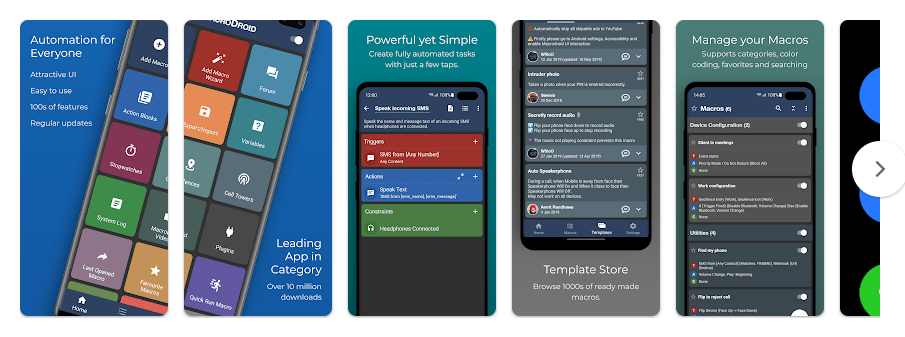
What Can You Do With Its Main Features?
- Open or close apps: MacroDroid can use triggers and actions to automate phone tasks. I used it to test automatic app opening or closing.
- Wi-Fi and Bluetooth actions: You can make actions happen when certain phone conditions are met. The app lists tasks such as turning Wi-Fi or Bluetooth on or off as automation options.
- Sound controls: MacroDroid can change sound settings based on rules. This can help set different sound behavior for work, sleep, or other daily times.
- Location actions: Rules can be linked to places you visit. For example, an action can run when you arrive at or leave a selected location.
- File tasks: The app can automate file copying, moving, and deleting. This can reduce repeated file work when the right trigger is set.
How Did It Perform on a Budget Phone?
I tested MacroDroid on a Redmi Android phone. The app ran smoothly with no major issues during my test.
I checked the screens and used the automatic app-opening and closing action. The controls responded normally, and I did not notice major scrolling lag while using the app.
There were no crashes during my test. The phone also did not become unusually hot while I used MacroDroid.
I did not notice a major battery problem during normal use. Battery use can change when many macros run often, so the result can be different based on the rules each person creates.
How Much Space and Data Does It Use?
Google Play does not show one fixed download size in MB on the current public listing, so I would not give a made-up number. The final installed size and cache can also change after installation and use.
MacroDroid may need internet access for some online features, while many phone actions can work locally after they are set up. The app may request permissions for features that need access to phone functions.
Google Play currently says MacroDroid may collect location, personal information, and two other data types. It also says the app may share app information, performance data, and device or other IDs with third parties; data is encrypted in transit, and users can request deletion.
Some features use Android Accessibility Services, but this access is optional. The developer says MacroDroid does not collect or log user data through its accessibility service.
How Does It Compare With Other Automation Apps?
MacroDroid competes with apps such as Tasker and Automate. MacroDroid has a free version with up to five macros, while Pro uses a one-time payment; Tasker is a paid app, and Automate is another Android automation option. MacroDroid is a good choice for users who want to build phone rules without writing code, while Tasker is known for offering more advanced controls.
What Are the Good and Bad Points?
Pros:
- Ran smoothly on my Redmi.
- Automatic app actions worked during testing.
- Free version is available.
- No subscription is needed for the Pro upgrade.
- Many types of phone actions are available.
Cons:
- The free version is limited to five macros.
- Ads are shown in the free version.
- Some features need extra permissions.
- Creating complex rules can take time to learn.
Is MacroDroid Right For You?
Who Should Install:
- People who want their phone to perform repeated tasks automatically.
- Users who want to automate app opening, closing, sound, network, or other phone actions.
Who Should Skip:
- People who never need automatic phone actions.
- Users who want a very basic app with no setup or rules.
Questions & Answers
Can MacroDroid open apps automatically?
Yes, app opening can be used as an automated phone action. I tested automatic app opening and closing during my use.
Is MacroDroid free?
Yes, there is a free version with ads and a limit of five macros. The Pro version removes ads and allows unlimited macros through a one-time payment.
Did MacroDroid work well on Redmi?
Yes, it ran smoothly during my test. I did not face major lag, crashes, heating, or other serious problems.
Offzack Verdict
MacroDroid is useful for Android users who want their phone to handle repeated actions automatically. My Redmi test was smooth, and the app-opening and closing automation worked as the main feature I checked.
Download MacroDroid – App on Google Play Store
Final Scorecard
- Ease of Use: ⭐⭐⭐⭐☆ / 5 — The basic macro setup and phone actions were easy to test.
- Performance: ⭐⭐⭐⭐⭐ / 5 — MacroDroid ran smoothly on my Redmi without major issues.
- Features: ⭐⭐⭐⭐⭐ / 5 — It offers many triggers and actions for different daily phone tasks.
- Privacy & Safety: ⭐⭐⭐⭐☆ / 5 — Google Play provides data-safety details, while some features require extra permissions.
- Value for Money: ⭐⭐⭐⭐⭐ / 5 — The free version is available, and the Pro upgrade uses a one-time payment instead of a subscription.
- Final Rating: ⭐⭐⭐⭐½ / 5 — It is a useful automation app that performed well during my Redmi test.