SD Maid 2/SE is an Android cleaning and file manager app made by darken. It helps find files that are no longer needed, leftover files from removed apps, duplicate files, and other items that can use phone storage. The app is made for people who want more control over the files on their phone.
I would open this app when my phone starts running low on free space. It can show where storage is being used and give tools to remove some unwanted files. It is also useful for checking old app files after uninstalling an app.
The app is free to download, has no ads, and some tools need a paid upgrade. It is also being updated for newer Android versions.
Space and Security Info
The current app package is small, with recent versions listed at around 6–14 MB depending on the build and source. The app itself can use more space after scans and saved data, but the main download is not large. It also works mainly with files already stored on the phone, so many cleaning tasks can be done without a constant internet connection.
The app can find caches, temporary files, leftover app files, and duplicate files. Play Store data safety says that the developer reports no data shared with third parties and no data collected. Some functions need wide storage access, usage access, or AccessibilityService access, so users should check these permissions before using advanced tools.
Real Device Test Run
I tested SD Maid 2/SE on a Redmi Android phone for two days. The app opened quickly, and moving between the main sections felt smooth during normal use. Scrolling through the lists was also easy when there were not too many files shown at once.
During longer scans, the phone became a little warm, which is normal when an app checks many files. I did not notice serious heating during simple browsing. Battery use also seemed reasonable for short cleaning tasks, but long storage scans can use more battery because the phone is working harder.
The scan results were easy to understand. I liked that the app showed what it wanted to remove instead of simply deleting everything without showing the user what was found.
Best Features to Use
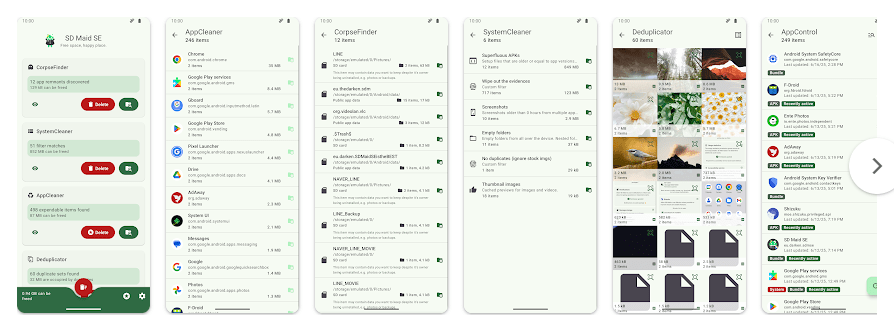
- AppCleaner: This tool looks for files that apps can leave behind, such as caches and other expendable data. It is useful when your phone has many apps and storage is getting low.
- CorpseFinder: This feature looks for files left behind after an app has been removed. It can show which old app the files belonged to before you choose to delete them.
- StorageAnalyzer: This tool shows how your phone storage is being used. It can help you find large areas of storage that need attention.
- Deduplicator: It searches for duplicate or similar files, including photos and downloads. This can help remove extra copies and save storage.
- Media Squeeze: This tool can reduce the size of images without simply deleting them. You can adjust the quality before saving space.
Alternative Apps
Google Files is a simpler choice for basic file cleaning and storage checks, while CCleaner offers a more general phone-cleaning experience. SD Maid 2/SE is more focused on detailed file management and leftover app data. SD Maid 2/SE is free to download, but some features need a paid upgrade, while the exact cost of other cleaner apps depends on their current plans.
Pros & Cons
Pros:
- Small app size
- No ads
- Many cleaning tools
- Finds leftover app files
- Strong storage management tools
Cons:
- Some tools need payment
- Advanced permissions can confuse beginners
- Long scans may use more battery
- Some features need extra Android access
Who Is This App Made For?
Who Should Use It:
- People who often run out of phone storage.
- Users who want more control over unwanted files.
Who Should Avoid It:
- People who want a very simple one-tap cleaner.
- Users who are not comfortable giving special permissions.
Frequently Asked Questions
Does SD Maid 2/SE work without internet?
Yes, many of its main file scanning and cleaning tasks work with files stored on the phone. An internet connection may still be needed for some app-related functions or updates.
Is SD Maid 2/SE safe to use?
The Play Store says the developer reports no data collected and no data shared with third parties. Still, users should understand special permissions before enabling advanced features.
Does SD Maid 2/SE delete files automatically?
The app normally gives you control over the files and cleaning actions. Its tools are designed to show items that can be removed, so you can review what you are cleaning.
Offzack Verdict
SD Maid 2/SE is a useful choice for Android users who want better control over phone storage. The app is small, has no ads, offers many useful tools, and gives more detail than a basic cleaner. The extra permissions may feel difficult for beginners, but careful users can get good value from it.
.Download SD Maid 2/SE from Play Store
Final Scorecard
- Storage Cleaning: 4.5/5 — It offers several tools for finding unwanted and leftover files.
- Privacy: 4.5/5 — Play Store reports no data collection or third-party data sharing.
- Performance: 4/5 — Normal use feels quick, while long scans can take more phone resources.
- Features: 4.5/5 — It includes cleaning, storage analysis, duplicate finding, and image compression.
- Ease of Use: 4/5 — Basic tools are clear, but advanced permissions may take time to understand.
- Overall Rating: 4.3/5 — SD Maid 2/SE is a good Android storage cleaner for users who want detailed control over their files.