Sending a large file can be hard when email or chat apps have file limits. ToffeeShare is made for sending files directly from one device to another. It uses peer-to-peer sharing, so the files are not stored on ToffeeShare’s servers.
The app can be useful when you need to send photos, videos, documents, or other files. It can also keep shared files available from an Android phone while the phone is on and has an active internet connection.
Storage, Internet, and Battery
I did not measure the exact download size, installed storage, or cache growth during my test, so I will not give false MB numbers. ToffeeShare needs an active internet connection for its normal sharing system, and the company says there is no file size limit.
During my use, I did not notice any major battery problem. The phone also did not show unusual heating while I was testing file sharing.
Hands-On Performance
I tested ToffeeShare on an Android phone with the main focus on file sharing. I sent files successfully, and the sharing process worked without major problems.
The app ran smoothly during my test. I did not notice major menu lag, crashes, heating, or visual glitches while using it.
My test was focused on sending files, so I did not test every tool or setting in the app. This means the score below is based mainly on the file-sharing experience.
Main Tools Built Into the App
- Direct file sharing: ToffeeShare sends files directly between devices using peer-to-peer technology. The company says files are not stored online on its servers.
- Large file transfers: The service does not set a file size limit. This can help when a file is too large for normal email or chat sharing.
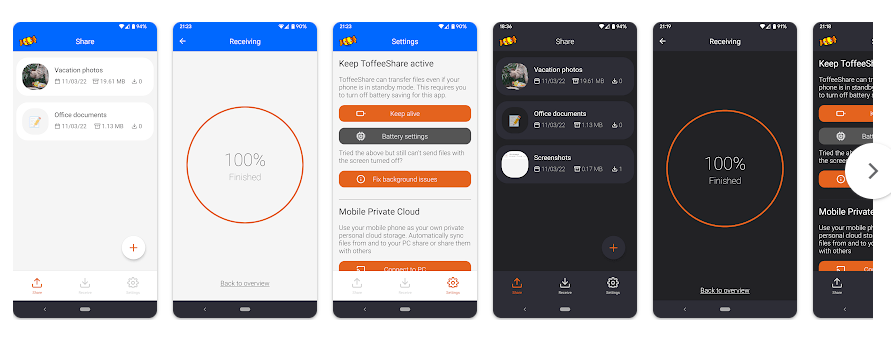
- QR code sharing: The service can use a QR code to connect a phone with a computer for file transfers. This can be easier than typing a long sharing code.
- Nearby device sharing: ToffeeShare has a nearby-device option that uses a short four-digit code on the same network. This makes local phone-to-PC sharing easier.
- Keep files available: The Android version can keep shared files available after the app is closed. The phone must stay on and have an active internet connection.
Privacy Checks
ToffeeShare says it uses peer-to-peer technology and does not store shared files on its servers. It also says transfers are protected with end-to-end encryption.
For permissions, the app may need access related to files and network communication because its main job is sending and receiving files. Camera access can also be needed when using the QR scanner. Permission requests can differ based on your Android version and device.
Comparison with Competitors
Files by Google is a strong alternative for nearby Android file transfers and says it can work without an internet connection. ToffeeShare is different because its main focus is direct peer-to-peer sharing and it does not set a file size limit. Send Anywhere is another popular file-sharing option, but ToffeeShare focuses more on direct sharing without storing the shared file online.
The Positives and Negatives
Pros
- Files were sent successfully in my test
- Simple file-sharing purpose
- No stated file size limit
- Peer-to-peer sharing
- No major issues during my test
Cons
- Internet connection is needed for normal sharing
- I did not measure exact storage use
- Some features were not tested
- The Android app is still described by the developer as being in active development.
Who Should Download This?
Ideal Users
- People who need to send large files.
- Users who want direct file sharing without online file storage.
Who Should Skip It
- People who want a file-sharing tool that works fully offline.
- Users who only need basic Android-to-Android sharing and already use Files by Google.
Quick Questions Answered
Can ToffeeShare send large files?
Yes. ToffeeShare says it has no file size limit. Your available internet connection and device storage can still affect the transfer.
Does ToffeeShare store my files online?
The company says shared files are not stored on its servers. Files are shared directly between devices using peer-to-peer technology.
Does ToffeeShare work on Android?
Yes. There is an Android app available, and the developer says it can keep files available while the phone is on and connected to the internet.
Offzack Verdict
ToffeeShare is worth trying if your main need is sending files from one device to another. My file-sharing test was successful, and the app ran smoothly without major issues during testing.
Download Toffeshare App From Playstore
Final Scorecard
- Ease of Use: ★★★★☆ — The main file-sharing process was simple during my test.
- Performance: ★★★★☆ — Files were sent successfully and I noticed no major lag.
- Features: ★★★★☆ — It offers peer-to-peer sharing, QR sharing, nearby devices, and large file support.
- Privacy & Safety: ★★★★☆ — ToffeeShare says files are not stored on its servers and transfers use end-to-end encryption.
- Value for Money: ★★★★★ — The core ToffeeShare service is free and has no stated file size limit.
- Overall Rating: ★★★★☆ — It worked well for the file-sharing task I tested.