Every year, I look at the wall in my kitchen and think about how much space that bulky, printed paper calendar takes up. It seems like such a waste of space, especially when you realize it only serves one purpose and leaves a giant physical footprint on the wall. What makes it worse is that as the months roll by, these paper sheets get torn, collecting dust while forcing you to squint just to find the micro-printed details about the daily tithi, nakshatram, or upcoming local bank holidays. Dealing with bloated physical organizers or digital utility options that consume hundreds of megabytes of phone storage just to check a date is a constant storage complaint of mine.
This digital storage problem is exactly what the Malayalam Calendar app (com.samvat.malayalamcalander) by Samvat Calendars LLP intends to fix. Instead of packing a multi-layered utility full of uncompressed graphic themes and background video assets that slow down your phone, this application serves as a compact, digital version of the classic traditional almanac. Over my full 2-day testing window under my normal daily routine, I wanted to see if this app provides a clean, storage-friendly alternative to tracking Kerala festivals, daily astrological details, and standard holidays without choking up my device storage.
My Phone Testing Setup
I conducted my entire user review using a Moto G85 running the clean Hello UI layer. My daily tracking routines were split evenly between my home Wi-Fi network and a basic mobile data network while moving around outside to see how fast the server-dependent assets load under real-world conditions. I purposefully monitored the application across a continuous 2-day testing window under standard multitasking routines, jumping back and forth between active chat groups, email portals, and my notification tray to check how well it behaves when kept running alongside my normal tools.
Real-World Hands-On Analysis
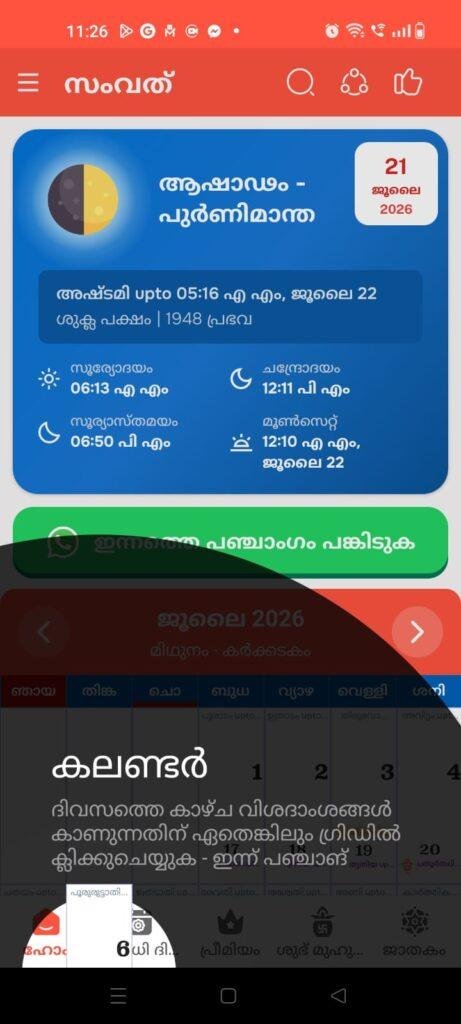
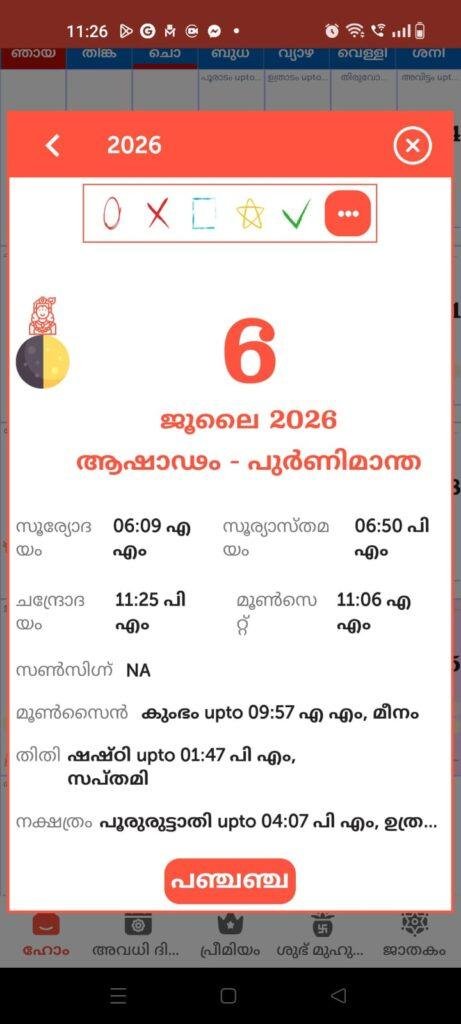
- Scenario 1: Checking Auspicious Timings for a Family EventOn a busy Monday morning, my family asked me to find out the exact timing for an upcoming local holiday and the matching tithi details for a traditional ceremony. I launched the app, swiped directly to the current month view, and tapped the date. The interface brought up a comprehensive list showing sunrise, sunset, and the nakshatram within under a few seconds, letting me share the correct details with my relatives without any system delays.
- Scenario 2: Reviewing Daily Horoscopes During BreakfastTo see how well the non-calendar features perform, I opened the integrated Malayalam horoscope section while sipping my morning tea. I tapped my specific zodiac sign from the grid menu. The application fetched the regular text-based horoscope advice instantly on my screen, maintaining clean text layouts that I could read without needing to zoom in or deal with broken font sizes.
- Scenario 3: Verifying Long Weekend Holidays While Planning a TripWhile sitting on a public transit commute late in the afternoon, I wanted to map out a small upcoming weekend trip. I loaded the app’s dedicated Kerala holidays tab to cross-check public bank closures and seasonal festivals. The list displayed all regional events in a simple vertical scrolling view, allowing me to bookmark my travel schedule without the app freezing up or closing unexpectedly when my mobile network signal dipped.
App Permissions & Device Safety
When downloading utility apps that deal with regional data or daily updates, checking what hardware sensors the system wants to open is vital for device safety. Here is a thorough breakdown of how the Malayalam Calendar app handled permission prompts during my 2-day observation window, organized as a clear checklist:
- Full Network Access: Requested immediately upon launching. The app claims to need constant internet privileges to download the updated daily panchangam assets, horoscope texts, and sudden changes to government holiday lists from its cloud servers.
- Storage Access / Photos and Media: Not requested during my testing. The app did not request storage permission during my testing window, as it renders the daily calendar sheets and details from its internal offline database assets or directly from the cloud without needing to access your private gallery folders.
- Notification Privileges: Requested during the first setup phase. This allows the utility to send you brief daily alerts regarding the current day’s star sign, significant fasting alerts like Ekadashi, or custom holiday reminders.
- Location Tracking: Not requested. The system did not prompt for precise or approximate GPS location data on my screen, allowing me to view the global calendar without checking my specific regional coordinates.
- Camera & Microphone Access: Completely ignored. The app contains no features for custom image taking or voice-controlled calendar searches, leaving these sensitive hardware modules entirely secure and untouched.
Speed & Everyday Performance
The overall snappiness of a calendar utility determines whether you will keep it as your daily reference tool or delete it for basic web searches. Below is my direct performance summary based on my 2-day usage experience, formatted as a detailed checklist:
- Download & Installation Time: The base file downloads from the official store within under a few seconds on a regular connection, setting up its home icon quickly without putting any pressure on your processor queue.
- Setup Speed: Moving past the initial load pane and landing on the main month view takes around 1 minute, letting you view dates immediately without forcing you through multi-page registration profiles.
- Menu Smoothness: Switching between the monthly sheet grid, the horoscope console, and the festival listings feels lightweight, though jumping between years can occasionally cause the numbers to take an extra second to align.
- Memory Load: The app leaves a highly optimized footprint in your phone’s active RAM, letting you minimize the screen to reply to an urgent chat and return to the exact same date display without a cold system reload.
- Active Battery Drain: Power usage is extremely low when you are simply looking at a static monthly calendar layout, though spending prolonged intervals reading long text horoscope sheets drains slightly more energy.
- Phone Warmth: My device remained completely cool to the touch during long browsing sessions, showing zero signs of heat build-up around the upper chassis area.
- Background Behavior: When you exit the app via the home button, it enters a deep standby state right away, ensuring it doesn’t drain your phone resources while sitting idle in your pocket.
- System Stability: The interface maintained excellent stability throughout my 2 days of testing, with no hard system crashes, though minor text alignment errors can occur if you rotate your screen rapidly.
Storage Space & Cache Build-Up
When I first fetched this calendar application from the Google Play Store, the download package size felt remarkably light, keeping its initial demands well down in a highly optimized megabyte bracket. This small requirement makes it an absolute lifesaver for users managing budget phones with very tight internal storage limits, as it won’t force you to wipe out your media library just to know when the next festival falls.
As you start exploring the application, clicking through different months, looking up historical panchangam dates, and opening multiple horoscope screens, the app data folder fills up with temporary cache files based on what I saw in my device settings. The app stores these tiny thumbnail assets and text files locally so it can load the calendar blocks instantly during your next run. My honest advice is that because the absolute size of this cache folder remains very low, you don’t need to clear it out manually unless your internal phone space is completely running out of room.
Battery Life & Daily Warmth
During my long, active observation windows—where I spent time comparing upcoming wedding muhurat dates and exploring old fasting traditions—the battery levels on my phone dropped by a very tiny margin. Because the calendar grid uses clean, mostly static elements that don’t require constant display refreshes or fast 3D animations, the active energy drain remains closely tied to your device’s baseline screen brightness rather than the software running on top of it.
The processor zone on the back of the device stayed completely comfortable and cool, proving that tracking lunar cycles and stellar alignments doesn’t put any heavy stress on the internal hardware. Standby performance was equally pristine, as the app sleeps quietly without triggering background sync errors or waking up the phone processor during the middle of the night.
offzack.in Quick Tip: If you only use the application to check standard national holidays, you can toggle off the daily notification alerts inside your phone settings to prevent the app from waking up your screen unnecessarily, which saves an extra bit of battery over time.
Network Needs & Data Usage
For mobile users operating under tight daily data limits, this application handles your internet data very carefully. Here are the core network parameters I observed during my evaluation, detailed as a clear checklist:
- Initial Setup Access Cost: Very low, requiring minimal mobile data to pull the base layout blocks down to your phone during the store download.
- Daily Usage Data Footprint: Extremely small for basic date checking, as loading the text-based holiday titles and tithi data points uses minimal bytes per action.
- Additional Asset Downloads: The utility does not force massive secondary resource downloads or mandatory video packages upon opening.
- Offline Support: The core calendar grids, regional holidays, and festival lists run completely offline once the app finishes its initial launch cycle. However, accessing fresh daily horoscope details or generating long-form astrology predictions requires an active internet connection to pull text from the cloud.
Monetization & User Security Review
The Malayalam Calendar app offers an incredibly user-friendly approach to initial setup access. When you open the utility for the first time, it allows for clean guest access right out of the box. You do not have to link your personal email profile, enter a phone number, or create a custom password just to see when the next long weekend occurs. This is an excellent structural design for basic data security, as it limits the amount of private metadata you have to share with the developers. According to the app’s Play Store Data Safety section, data is encrypted securely while in transit, though it notes that personal data cannot be deleted manually from within the settings layout.
In terms of monetization, the application is offered completely for free and relies entirely on an ad-supported system. You will encounter standard programmatic inline banner advertisements sitting at the base of your month grids, along with full-screen pop-up countdown advertisements when you transition between the main calendar page and the astrology menus. The app also includes optional in-app purchases if you wish to remove these commercial interruptions entirely. While the pop-up ads can sometimes pop up unexpectedly when you are trying to check a date quickly, the model remains a fair trade for gaining complete, free access to a traditional almanac database.
Mistakes I Noticed During Testing
No mobile application is completely perfect, and during my 2 days of regular, daily routines, I encountered three specific layout flaws that can affect the overall user experience:
- Minor Regional Spelling Errors: While browsing the main menu items and title headers, I noticed a few minor spelling mistakes in the Malayalam font rendering—such as the word for calendar missing its correct ending character—which can be a bit jarring for native speakers who appreciate precise textual formatting.
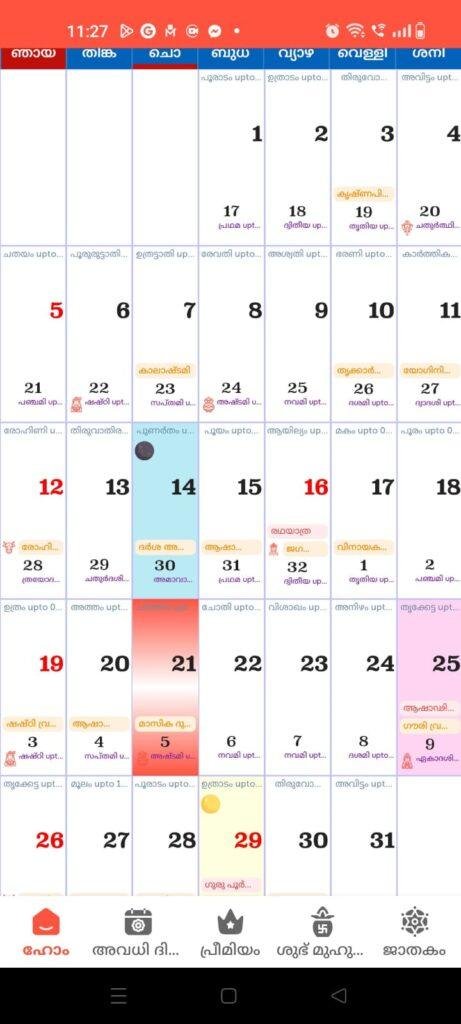
- Highlight Confusion on Grid Views: The current layout bakes a lot of colorful indicators into the monthly grid view to mark holidays, fasting days, and special events. Because there are so many overlapping colorful squares on the screen at the same time, it can sometimes get confusing to see exactly which square represents the current date at a rapid glance.
- Missing Swipe Navigation Toggles: When trying to move quickly from the current month view to the next upcoming month, the app layout did not support simple horizontal finger swiping across the screen. I had to tap the top directional arrow keys manually every single time, which feels a bit clunky compared to modern layout navigation standards.
Main Features Explained
- Complete Malayalam Panchangam Guides: The app displays daily timings for sunrise, sunset, moonrise, and moonset alongside explicit breakdowns of tithi, paksha, and nakshatram details for traditional tracking.
- Comprehensive Kerala Holiday Database: Includes a pre-loaded, easily accessible list of all major state bank holidays, restricted closures, public administrative breaks, and cross-cultural regional events.
- Integrated Astrological Horoscopes: Features a dedicated shortcut panel that provides quick access to daily and weekly horoscope text summaries matching your traditional zodiac signs.
- Auspicious Muhurat Planners: Offers specialized sub-menus highlighting ideal dates and timings for weddings, housewarming ceremonies, and major personal transitions throughout the calendar year.
- Offline Operational Core: Allows the primary date grid and festival folders to run smoothly without needing an active internet connection, making it highly reliable in remote areas.
Pros & Cons
What I Liked
- The setup download package is remarkably compact, saving valuable internal phone space on lower-end devices.
- The primary calendar functions operate beautifully without needing an active data network or cellular connection.
- The inclusion of clean guest access means you can use the core features without giving away your email details.
What Could Be Better
- The lack of horizontal swipe gestures makes flipping through multiple months feel slightly clunky.
- The visual layout can feel cluttered due to too many contrasting colorful squares highlighting dates simultaneously.
- The frequent appearance of full-screen pop-up ads can disrupt your speed when checking entries in a hurry.
Industry Comparison
When deciding on a digital almanac companion, it helps to see how this app stands up against its closest alternatives in the same regional utility space:
Mathrubhumi Calendar represents a major mainstream brand in the Kerala calendar space, offering a highly polished interface that mirrors the exact look of their popular printed paper sheets. It features a very distinct coloring rule where holidays are marked in a bright red tint and the current day is clearly highlighted in yellow, making it incredibly simple to read at a glance. However, the Mathrubhumi app carries a larger download size and can feel a bit graphic-heavy on older hardware compared to the lighter Samvat alternative.
Manorama Calendar is another massive alternative that comes packed with deep community feature sets, including sync capabilities with your phone’s personal organizer and custom note-taking pads. It offers an incredibly clean modern design but places certain historical folders and advanced astrological predictions behind premium payment barriers. The Samvat app stands as a more accessible alternative if you just want quick, direct access to basic panchangam tables without buying a separate subscription.
Clickastro Malayalam Calendar focuses almost entirely on deep, highly detailed astrological charts, planetary alignments, and exhaustive horoscope PDF generations. While it is a powerhouse for individuals who follow intensive daily calculations, the interface can feel overwhelming for a standard user who just wants to check a simple holiday date. Samvat bridges this gap nicely by keeping its focus centered around a traditional monthly calendar view while keeping the horoscope options as an optional side menu.
Audience Recommendations
Who Should Install It?
- Space-Conscious Users: Anyone who wants to keep track of traditional Kerala dates but refuses to clog up their phone storage with bloated applications.
- Traditional Event Planners: Individuals who frequently need to cross-reference nakshatram timings, fasting rules, and auspicious muhurat calendars on the go.
- Rural Commuters: Users who travel through deep signal dead zones frequently and require a reliable offline date book.
Who Should Skip It?
- Ad-Averse Individuals: If you cannot stand full-screen promotional pop-ups triggering when you hop between different feature menus.
- Visual Purists: Users who prefer minimalist, clean display grids without overlapping color codes or minor font translation flaws.
Common FAQs
- Can I access the monthly calendar grids if my phone has no active network data?Yes, the core calendar layout, festival archives, and state holiday indices are stored internally, allowing you to view them completely offline without using mobile data.
- Does the application support sync options with my standard phone calendar?The current version operates as an independent, standalone viewing gallery and does not feature auto-sync capabilities with external system planners.
- Why are there so many colored boxes highlighting the dates inside the grid view?The different colors are utilized by the layout design to instantly flag significant calendar events, such as public bank holidays, restricted state breaks, and traditional fasting periods.
Official Store Access
Independent Disclaimer: The link provided below points directly to the official digital marketplace hosted by the platform provider. offzack.in is not associated with the external developer team and recommends reviewing application data safety summaries before initiating any device installations.
The offzack.in Final Verdict
The Malayalam Calendar app by Samvat Calendars LLP is an excellent, highly practical utility that successfully shrinks a traditional wall almanac into a pocket-friendly digital format. While the navigation lacks swipe gestures and the ad frequency can test your speed, its tiny storage footprint, strong offline usability, and zero login hurdles make it a fantastic tool. If you want a quick, dependable way to track Kerala festivals and daily panchangam details without slowing down your phone, you should definitely install this application today.
Final Scorecard
- Ease of Use [3.8/5]: The monthly grids are straightforward to read, though the lack of horizontal swiping options makes jumping between months feel a bit clunky.
- Speed & Performance [4.4/5]: The interface runs smoothly on modest hardware, causing no thermal issues or background memory drag.
- Features [4.2/5]: Packing full panchangam data, holiday tracking, and daily horoscopes into a lightweight package offers great utility.
- Privacy & Safety [4.3/5]: Providing immediate guest access without demanding email profiles or tracking location is a massive win for basic data safety.
- Value for Money [4.5/5]: The app delivers its entire suite of traditional database tools completely for free, making the commercial pop-ups a reasonable compromise.
- Overall offzack.in Score: 4.2 / 5