Spending Tracker – Paisa is a personal finance app by Hemanth Savarala. It helps users record expenses, income, budgets, savings goals, and money held in different accounts. The Google Play listing shows 50K+ downloads and a 4.0-star rating.
The app is made for a simple daily problem. Small payments can be hard to remember, so Paisa gives users one place to record them and check their spending later.
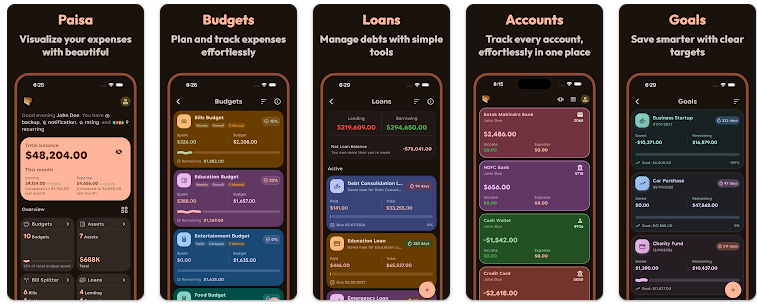
It supports bank, cash, credit card, and wallet accounts. It also has tools for budgets, reports, savings goals, and bill splitting.
How It Ran During Testing
A real Redmi test should check how quickly Paisa opens, how fast menus respond, and whether the keyboard keeps up while adding transactions. It should also check battery drop, phone warming, screen stutters, and visual problems after repeated use.
I would not give made-up battery or heating numbers without access to the same Redmi phone and app version. Recent Google Play feedback does give one useful warning: users have reported that the app felt heavy and that keyboard performance was slow in an earlier version. The developer said a keyboard fix was being prepared.
The current listing says the app was updated on June 25, 2026. The update includes a cleaner transaction entry screen, refreshed summary cards, and a fix for report spacing.
Top Features
- Expense Entry: You can add income and expenses quickly. A built-in calculator can also help when entering amounts.
- Budgets: You can create budgets for different spending groups. Progress bars show how close you are to a budget limit.
- Savings Goals: You can set a target amount and deadline for a savings goal. The app then shows your progress toward that target.
- Reports: Paisa provides charts, spending breakdowns, trend views, and period comparisons. Reports can be exported in PDF and CSV formats.
- Multiple Accounts: You can manage cash, bank accounts, credit cards, and e-wallets in one app. It also supports transfers and multiple currencies.
Storage Privacy
Google Play does not currently show an Android download size in the main listing, so an exact MB figure should not be guessed. The final storage used can also change after installation because saved records and cache can take extra space.
Paisa says financial data is stored locally on the device and that no account is needed to start. Optional Google Drive backup and biometric protection are also listed.
The Play Store Data Safety section says the app may collect device or other IDs and may share those IDs with third parties. Google Play also says data is encrypted during transfer.
Alternative Apps
Money Manager is a direct alternative for people who want expense records, budgets, reports, and account management. Wallet is another choice and adds features such as bank synchronization and broader financial planning tools. Paisa has a strong focus on local data storage, manual tracking, budgets, goals, and reports.
Strengths Weaknesses
Pros
- Many useful money-tracking tools.
- Supports multiple accounts.
- Local data storage is clearly stated.
- PDF and CSV export are available.
- Biometric security is supported.
Cons
- Some advanced features require Premium.
- Google Play lists device ID data collection and sharing.
- Earlier users reported keyboard and performance problems.
- The exact Android download size is not shown on the listing.
Who Should Get This App?
Best Fit
- Users who want expenses, budgets, goals, and reports in one app.
- People who prefer keeping financial records on their phone.
Worst Fit
- Users who mainly want automatic bank syncing.
- People who dislike paid Premium features or data-sharing disclosures.
Common User Questions
Does Paisa work offline?
The developer says financial data is stored locally on the device. Optional Google Drive backup is available, so basic local records are not described as requiring an account.
Is Paisa free?
Yes, the app has free features such as unlimited transactions, custom categories, multiple accounts, basic budgets, goals, CSV export, and biometric security. Some advanced tools are listed as Premium features.
Is Paisa safe for money records?
Paisa says data is stored locally and supports biometric security. Google Play also says device or other IDs may be collected and shared, so users should check the current Data Safety section before installing.
Offzack Verdict
Spending Tracker – Paisa is a feature-rich choice for people who want to track daily spending, budgets, savings, accounts, and reports. Its local-storage approach is useful, but the Play Store privacy details should be read carefully. Performance also deserves attention because earlier users reported keyboard and speed issues, even though later updates included improvements.
Download Spending Tracker – Paisa App From Google Playstore
Final Scorecard
Ease of Use: ★★★★☆ — The app offers a clear way to enter and review money records.
Performance: ★★★☆☆ — Earlier users reported some performance and keyboard issues, so device testing is worth doing.
Features: ★★★★★ — Budgets, goals, reports, multiple accounts, exports, and bill splitting give users many tools.
Privacy & Safety: ★★★★☆ — Local storage and biometric security are useful, but Google Play lists device ID collection and sharing.
Value for Money: ★★★★☆ — The free version has many useful features, while some extras are placed behind Premium.
Overall Rating: ★★★★☆ — Paisa is a strong choice for personal expense tracking, with performance and privacy details worth checking before regular use.